How to use C struct pointers in WASM
How to call a C function that takes a pointer to a struct as arguments from WASM.
I recently had to add a C function to a WASM module that took a pointer to a struct as an argument. I had never done this before, so I thought I would write up a quick example to help me remember how to do it.
There are several ways to do this. I was trying to leave the original C source unchanged. A different approach to the one below is to add functions to the WASM module that take primitive types and return a pointer to the struct.
Sample Application
A sample application can be found here.
Clone, install dependencies, and run.
git clone git@github.com:achyde/simple_vue_with_wasm_pointers.git
cd simple_vue_with_wasm_pointers
npm install
npm run dev
Scaffold a Vite Project By Hand
You can skip this section and just clone the example repo. If you wish to begin from scratch, scaffold a Vite project with the following command:
npm create vite@latest simple_vue_with_wasm_pointers  -- --template vue-ts
cd simple_vue_with_wasm_pointers
npm i @types/node -D
npm install
npm run dev
Remove HelloWorld.vue from src/components. We will just do the example in App.vue.
Edit App.vue to look like this:
<script setup lang="ts">
import {calculate_sgp4} from '@/wasm/sgp4Client';

calculate_sgp4({
      epoch: 0,
      xndt2o: 1,
      xndd6o: 2,
      bstar: 3,
      xincl: 4,
      xnodeo: 5,
      eo: 6,
      omegao: 7,
      xmo: 8,
      xno: 9,
      catnr: 10,
      name: "test"
    },
    {
      lat: 0,
      lon: 0,
      alt: 0,
      theta: 0
    },
    123.123).then((look_angle: any) => console.dir(look_angle));

</script>

<template>
  <div>
    Read the developer console for the result of the WASM call.
  </div>
</template>

<style scoped>
</style>
You will need to edit the vite.config.ts file to handle the @ alias we are using.
import { defineConfig } from 'vite'
import path from 'path'
import vue from '@vitejs/plugin-vue'

// https://vitejs.dev/config/
export default defineConfig({
  plugins: [vue()],
  resolve: {
    alias: {
      '@': path.resolve(__dirname, './src'),
    }
  },
})
The alias @ symbol will also have to be added to the tsconfig.json file.
{
  "compilerOptions": {
    "target": "ESNext",
    "useDefineForClassFields": true,
    "module": "ESNext",
    "moduleResolution": "Node",
    "strict": true,
    "jsx": "preserve",
    "resolveJsonModule": true,
    "isolatedModules": true,
    "esModuleInterop": true,
    "lib": ["ESNext", "DOM"],
    "paths": {
      "@/*": [
        "./src/*"
      ]
    },
    "skipLibCheck": true,
    "noEmit": true
  },
  "include": ["src/**/*.ts", "src/**/*.d.ts", "src/**/*.tsx", "src/**/*.vue"],
  "references": [{ "path": "./tsconfig.node.json" }]
}
Add a new folder to the src directory called wasm.
Add index.d.ts file to src/wasm/. This will be used to define the types for the WASM module.
interface Geodetic{
    lat:number;    /*!< Lattitude [rad] */
    lon:number;    /*!< Longitude [rad] */
    alt:number;    /*!< Altitude [km]? */
    theta:number;
}
interface Tle{
    epoch:number;            /*!< Epoch Time in NORAD TLE format YYDDD.FFFFFFFF */
    xndt2o:number;           /*!< 1. time derivative of mean motion */
    xndd6o:number;           /*!< 2. time derivative of mean motion */
    bstar:number;            /*!< Bstar drag coefficient. */
    xincl:number;            /*!< Inclination */
    xnodeo:number;           /*!< R.A.A.N. */
    eo:number;               /*!< Eccentricity */
    omegao:number;           /*!< argument of perigee */
    xmo:number;              /*!< mean anomaly */
    xno:number;              /*!< mean motion */
    catnr:number;            /*!< Catalogue Number.  */
    name:string;     /*!< Satellite name string. */
}
interface SatelliteLookAngel{
    az: number,
    el: number,
    range: number,
    range_rate: number,
}
Add a new file to the wasm directory called sgp4Client.ts. This file will be our WASM client. It will import the WASM module and export a function calculate_sgp4 that will call the WASM module. The sgp4Client.ts file should look like this:
const BYTES_PER_FLOAT = 8;
const BYTES_PER_INT = 4;

// @ts-ignore
import Module from "@/wasm/sgp4.js"

const create_geodetic_wasm = (module:any) => module._malloc(40); //(10 * 4)
const set_geodetic_wasm = (module:any, ptr:any, lat:number, lon:number, alt:number, theta:number) => module.HEAPF64.set(new Float64Array([lat, lon, alt, theta]), ptr / 8);

const create_obs_set_wasm = (module:any) => module._malloc(40); //(10 * 4)
const set_obs_set_t = (module:any, ptr:any, az:number, el:number, range:number, range_rate:number) => module.HEAPF64.set(new Float64Array([az, el, range, range_rate]), ptr / 8);

const create_tle_wasm = (module:any) => module._malloc(107); //(10 * 8) + (1 * 2) + (25 * 1) = 80+2+25 = 107
const set_tle_wasm = (module:any,
                      ptr:any,
                      epoch:number,
                      xndt2o:number,
                      xndd6o:number,
                      bstar:number,
                      xincl:number,
                      xnodeo:number,
                      eo:number,
                      omegao:number,
                      xmo:number,
                      xno:number,
                      catnr:number,
                      sat_name:string,
) => {

    module.HEAPF64.set(new Float64Array([epoch, xndt2o, xndd6o, bstar, xincl, xnodeo, eo, omegao, xmo, xno]), ptr / BYTES_PER_FLOAT);
    ptr += (10 * BYTES_PER_FLOAT);

    module.setValue(ptr, catnr, "i32");
    ptr += BYTES_PER_INT;

    module.stringToUTF8(sat_name, ptr, 25);
};

let module:any = null;

export const calculate_sgp4 = async (tle:Tle, geodetic:Geodetic, time:number):Promise<SatelliteLookAngel> => {
    if (module === null) {
        module = await Module();
    }

    const tle_wasm = create_tle_wasm(module);
    const geodetic_wasm = create_geodetic_wasm(module);
    const result = create_obs_set_wasm(module);

    set_tle_wasm(module,
        tle_wasm,
        tle.epoch,
        tle.xndt2o,
        tle.xndd6o,
        tle.bstar,
        tle.xincl,
        tle.xnodeo,
        tle.eo,
        tle.omegao,
        tle.xmo,
        tle.xno,
        tle.catnr,
        tle.name);

    set_geodetic_wasm(module,
        geodetic_wasm,
        geodetic.lat,
        geodetic.lon,
        geodetic.alt,
        geodetic.theta);

    set_obs_set_t(module, result, 0, 0, 0, 0);

    module._sgp4(tle_wasm, geodetic_wasm, time, result);

    const resultArray = new Float64Array(module.HEAPF64.buffer, result, 4);

    const returnValue = {az: resultArray[0], el: resultArray[1], range: resultArray[2], range_rate: resultArray[3]};

    module._free(geodetic_wasm);
    module._free(result);
    module._free(tle_wasm);

    return returnValue;
};
Let’s walk through sgp4Client.ts
The first 6 functions are a group of create/set methods. The create method is making a call to _malloc which is exported by the wasm module. The set methods fill out the contiguous block of memory that was allocated by the create method. The set methods are using the HEAPF64 array to set the values. The HEAPF64 array is a Float64Array that is a view of the WASM memory. The set methods are using the set method of the Float64Array to set the values. The set methods are also incrementing the pointer by the number of bytes that were set. The pointer is used to keep track of where in the memory block we are setting the values. set_tle_wasm illustrates how to set mixed data types in the struct. The key is to view the struct as an array of memory.
calculate_sgp4 first makes a check to see if the Module has been created. If not we await its creation. Then the data is allocated and passed to _sgp4. Remember to free the data using _free.
Next we add the C files to the wasm directory.
sgp4.h
#ifndef SGP4_H
#define SGP4_H

typedef struct
{
    double epoch;            /*!< Epoch Time in NORAD TLE format YYDDD.FFFFFFFF */
    double xndt2o;           /*!< 1. time derivative of mean motion */
    double xndd6o;           /*!< 2. time derivative of mean motion */
    double bstar;            /*!< Bstar drag coefficient. */
    double xincl;            /*!< Inclination */
    double xnodeo;           /*!< R.A.A.N. */
    double eo;               /*!< Eccentricity */
    double omegao;           /*!< argument of perigee */
    double xmo;              /*!< mean anomaly */
    double xno;              /*!< mean motion */

    int    catnr;            /*!< Catalogue Number.  */
    char   name[25];     /*!< Satellite name string. */
} tle_t;

typedef struct
{
    double lat;    /*!< Lattitude [rad] */
    double lon;    /*!< Longitude [rad] */
    double alt;    /*!< Altitude [km]? */
    double theta;
} geodetic_t;

typedef struct
{
    double az;            /*!< Azimuth [deg] */
    double el;            /*!< Elevation [deg] */
    double range;         /*!< Range [km] */
    double range_rate;    /*!< Velocity [km/sec] */
} look_angle_t;

int sgp4 (tle_t *ephem, geodetic_t *observer, double time, look_angle_t *look_angle);

#endif
sgp4.c
#include <math.h>
#include <stdio.h>
#include <stdlib.h>
#include <string.h>
#include <time.h>

#include "sgp4.h"

int sgp4 (tle_t *ephem, geodetic_t *observer, double time, look_angle_t *look_angle)
{
    fprintf(stderr,"ephem.epoch => %f\n", ephem->epoch);
    fprintf(stderr,"ephem.xndt2o => %f\n", ephem->xndt2o);
    fprintf(stderr,"ephem.xndd6o => %f\n", ephem->xndd6o);
    fprintf(stderr,"ephem.bstar => %f\n", ephem->bstar);
    fprintf(stderr,"ephem.xincl => %f\n", ephem->xincl);
    fprintf(stderr,"ephem.xnodeo => %f\n", ephem->xnodeo);
    fprintf(stderr,"ephem.eo => %f\n", ephem->eo);
    fprintf(stderr,"ephem.omegao => %f\n", ephem->omegao);
    fprintf(stderr,"ephem.xmo => %f\n", ephem->xmo);
    fprintf(stderr,"ephem.xno => %f\n", ephem->xno);
    fprintf(stderr,"ephem.catnr => %d\n", ephem->catnr);
    fprintf(stderr,"ephem.name => %s\n", ephem->name);

    fprintf(stderr,"observer.lat => %f\n", observer->lat);
    fprintf(stderr,"observer.lon => %f\n", observer->lon);
    fprintf(stderr,"observer.alt => %f\n", observer->alt);
    fprintf(stderr,"observer.theta => %f\n", observer->theta);

    fprintf(stderr,"time => %f\n", time);

    look_angle->az = ephem->xndt2o;
    look_angle->el = ephem->xndd6o;
    look_angle->range = 100.55;
    look_angle->range_rate = 0.33;

    return 0;
}
The C file just prints the struct and returns a filled out argument struct pointer.
TIP
If you omit the trailing \n from you will not see the output. There must be a \n to flush the buffer.
Next we add a bash file for building the wasm module. build.sh
docker run --rm -v $(pwd):/src -u $(id -u):$(id -g) emscripten/emsdk emcc sgp4.c -o sgp4.js  -s EXPORTED_RUNTIME_METHODS='["cwrap", "getValue", "setValue", "stringToUTF8"]' -s EXPORT_ES6=1 -s MODULARIZE=1 -s USE_ES6_IMPORT_META=0 -s EXPORTED_FUNCTIONS='["_sgp4", "_malloc", "_free"]' -O3
mv sgp4.wasm ../../public/sgp4.wasm
This calls the docker image emscripten/emsdk to do the emcc build. EXPORTED_FUNCTIONS=’[“_sgp4”, “_malloc”, “_free”]’ is where we tell emcc to export the sgp4 function and the malloc/free functions. The sgp4 function is the function that we will call from the wasm module. The malloc/free functions are used by sgp4Client to allocate memory for the struct pointers. Remember you need to free the memory that was allocated by malloc.
Running the code
Now we can run the code.
cd src/wasm
./build.sh
cd ../..
npm run dev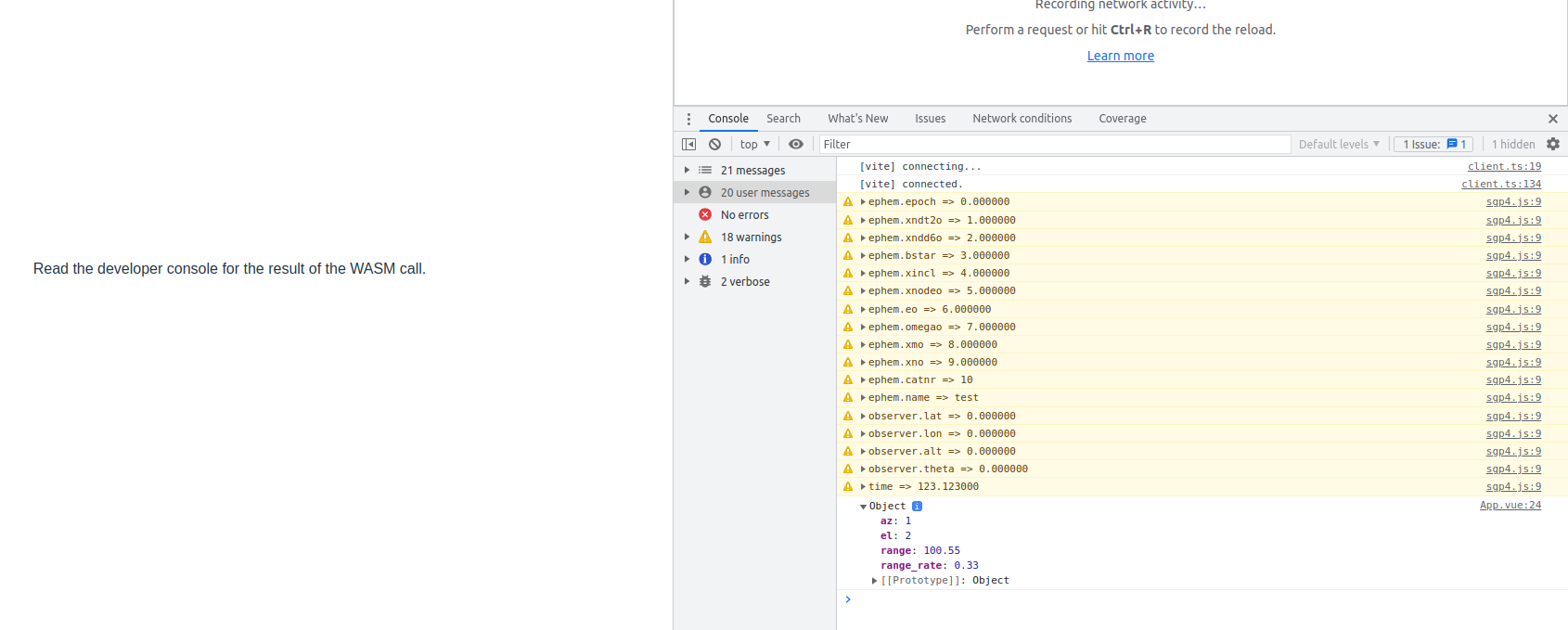
Screen Shot Of Running Application
What Have We Done?
- We took a vite vue starter template and modified it to allow the @ alias. This was just for convenience.
- We removed the HelloWorld component.
- We added the src/wasm directory and associated files.
- The App.vue file was modified to include calculate_sgp4 from our sgp4Client module in src/wasm.
- In App.vue we create the required data types and call the calculate_sgp4.
- In App.vue We then display the results in the browser.